Certificate is a joke does not work
Moderators: Bill Smith, Pilot
-
desidude2000
- MagicJack User
- Posts: 36
- Joined: Mon Sep 22, 2008 4:16 pm
-
steve_togo
- MagicJack Expert
- Posts: 84
- Joined: Tue Dec 09, 2008 5:32 pm
MJMD5 Help still not working linksys ata
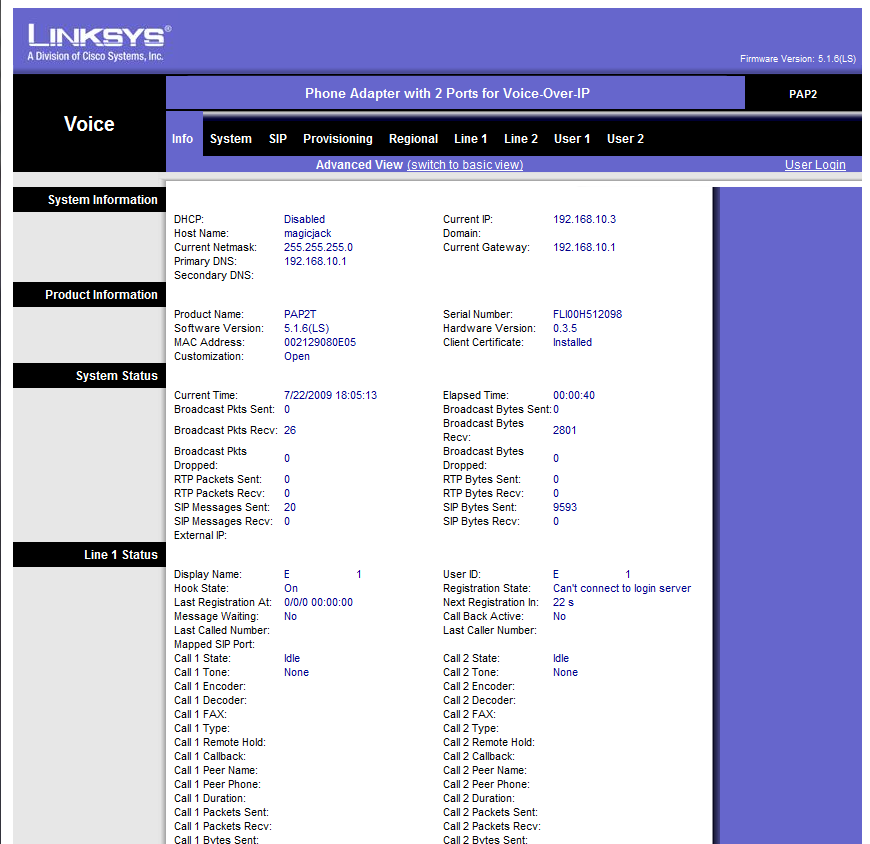
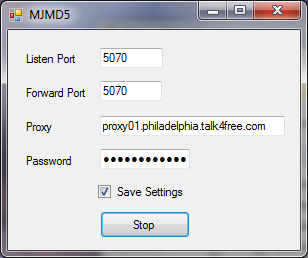
If someone would be so kind to help out a distraught and sufferring MJ user. I've looked at all the post mentioning the MJMD5 proxy, and I cannot get mine to register, keeps saying can't connect to login server. My MJ password is correct, and verified. I plug dongle back in to my pc, and incoming and outgoing works, and password is the same, not changed. I am running the proxy on the same pc mj was installed, and then another machine still no dice. I REALLY REALLY NEED to get this working to stop the freaking bleeps during a call. I also have the proxy from philadelphia like MJUser403. I've spent weeks on this, since this fix first came, and it seem so easy. MY last resort is to wipe out all the info and start over again, and maybe use line 2 instead of one, if that makes any difference. Could someone please answer this question for me, since I"m tell the ata to look for the proxy on my pc, do I still need to have the dongle plugged with magicjack still running? Also do I need to change the user id, and password in the ATA, leave blank or what? Do I still need to leave my user id Exxxxxxxxx01 in the auth field, and select yes to authenticate? Thx for any insight or help!
Re: MJMD5 Help still not working linksys ata
You don't have to leave the MJ in the dongle. It probably is a bad idea to have it in the dongle. If you can take a screenshot of your LINE 1 page in your router and post it here, we can all look at it to see if you have it set right. It shouldn't matter if your user id is visible, just as long as the password is not (it probably will show up as asterisks, which is good).
Re: MJMD5 Help still not working linksys ata
Sure, definitely no problem, and I might mention that when sipsorcery was up, I was able to use that with the same password, and it worked till MJ caught on, and blocked sipsorcery.MJuser403 wrote:You don't have to leave the MJ in the dongle. It probably is a bad idea to have it in the dongle. If you can take a screenshot of your LINE 1 page in your router and post it here, we can all look at it to see if you have it set right. It shouldn't matter if your user id is visible, just as long as the password is not (it probably will show up as asterisks, which is good).
Here is my info page:

And here is how I have my MJMD5 proxy server setup:
Re: MJMD5 Help still not working linksys ata
I am having a similar problem using the same proxy as this user. I get the same error message. I use the command line version for linux and also tried the windows one. I get the same cannot connect to the login server message. I have not verified that all my settings are exactly the same as this user, but I know mine had worked before they changed stuff and cant seem to get it to work with the philly proxy.wondabwoy wrote: And here is how I have my MJMD5 proxy server setup:
Is it possible to use a different proxy? If so, is there a list somewhere?
Yes you can use any proxy. It is wise to use one close to you to reduce the delay.
I also suggest that all use the actual IP address instead of the name. You and find this address by using tracert or nslookup in a command window. This eliminates a lot of issues with DNS.
xxx.xxx.xxx.xxx:5070
Here is a link to an old list. There may be a better one somewhere.
http://www.dslreports.com/forum/r209511 ... -are-using
I also suggest that all use the actual IP address instead of the name. You and find this address by using tracert or nslookup in a command window. This eliminates a lot of issues with DNS.
xxx.xxx.xxx.xxx:5070
Here is a link to an old list. There may be a better one somewhere.
http://www.dslreports.com/forum/r209511 ... -are-using
I am having the same problem as wondabwoy and blueadept. I have a fairly new magicjack (bought in july) that is being problematic. I am using the linux mjproxy, and it is working fine with my older magicjacks. I was able to pull the sip info and i have verified that is it correct. But yet i am still unable to register.
i am lost
Hi every one,
please excuse my ignorance, but i am lost i don't know where to start! i got my Username Exxxxxxxx01 "which i think a 2 yrs old could do that"
for the password i used AutoMagic and i am not sure is this is the right password!
For now i am trying to setup x-lite just to test it, after that i will use it my Asterisk box.
but how can i use a proxy? which one do i use? MJproxy where can i get it? i saw guys here talking about flashing a linksys router ... well like i said i am in a complete lost ...please help.
thank you in advance!
please excuse my ignorance, but i am lost i don't know where to start! i got my Username Exxxxxxxx01 "which i think a 2 yrs old could do that"
for the password i used AutoMagic and i am not sure is this is the right password!
For now i am trying to setup x-lite just to test it, after that i will use it my Asterisk box.
but how can i use a proxy? which one do i use? MJproxy where can i get it? i saw guys here talking about flashing a linksys router ... well like i said i am in a complete lost ...please help.
thank you in advance!
It is always layer 8 problem!
compiled this using ubuntu.teddy_b wrote:Ok, here's the plain C version of the simple MJ proxy:
http://www.mediafire.com/file/yzwmjzotm ... y.c.tar.gz.
It works exactly the same as the az1324's app - the only difference is that it doesn't need mono to run on Linux - can be compiled for [almost] any linux distribution, including embedded systems like OpenWRT.
Of course, you need to know how to compile applications from sources for your linux system. You can create a Makefile, or just run gcc to compile it, somethig like:
gcc -o mjproxy md5.c mjproxy.c
Run it using the following command:
mjproxy listen-ip(can use 0.0.0.0) listen-port your-preferred-mj-proxy-server-addr mj-proxy-port(should be 5070) your-mj-password
The listen port should also be 5070 for incoming calls to work, however outgoing should work with any listen port.
Then configure your client the same way as you did for az1324's proxy - specify the listening IP and port of the proxy as the outbound proxy on your ATA or * trunc. Just remember not to expose this proxy to the Internet without additional protection, as anybody who can connect to it will only need to know your MJ phone number to be able to register and make calls using your MJ account.
You can modify the app as you wish - clean up the mess in my code (I've been doing .NET stuff for too long), add more console output or logging, add support for config file, make it to replace user-agent, etc etc... But I suggest you don't spend too much time on it - MJ seems to be determined to screw up any attempts to use MJ service without the dongle, so I bet it's not going to last long... And the next time dtm may not be around to discover the changed algorithm, or it will take someone too long to figure it out...
Ordered pap2t-na. Once I get that setup, want to run mjproxy on ubuntu PC.
From ubuntu terminal I run the following cmd line:
Code: Select all
./mjproxy 0.0.0.0 5070 proxy01.mycity.talk4free.com 5070 xxxxxxxxxxxxxxxxxxxxWhat should the listen-ip be? the ip of ATA, router or ubuntu pc running mjproxy?
TIA
what about DD-WRT instead using Tomato ...
what about DD-WRT instead using Tomato ... will work with DD-WRT or not?
I have one Linksys WRT-54GS but is version 5.1 and Tomato isn't working with my router. If I will put DD-WRT v24 firmware will work with this proxy. I found DD-WRT have SSH acces ( http://www.dd-wrt.com/wiki/index.php/Script_Examples ). How can I compile c source of mjproxy for WRT-54GS?
I have one Linksys WRT-54GS but is version 5.1 and Tomato isn't working with my router. If I will put DD-WRT v24 firmware will work with this proxy. I found DD-WRT have SSH acces ( http://www.dd-wrt.com/wiki/index.php/Script_Examples ). How can I compile c source of mjproxy for WRT-54GS?